I want to save money on the videos I plan to make for my book chapters and book trailers. I’ll post here about my progress. I’m a total newbie at this, so we’ll see how it goes.
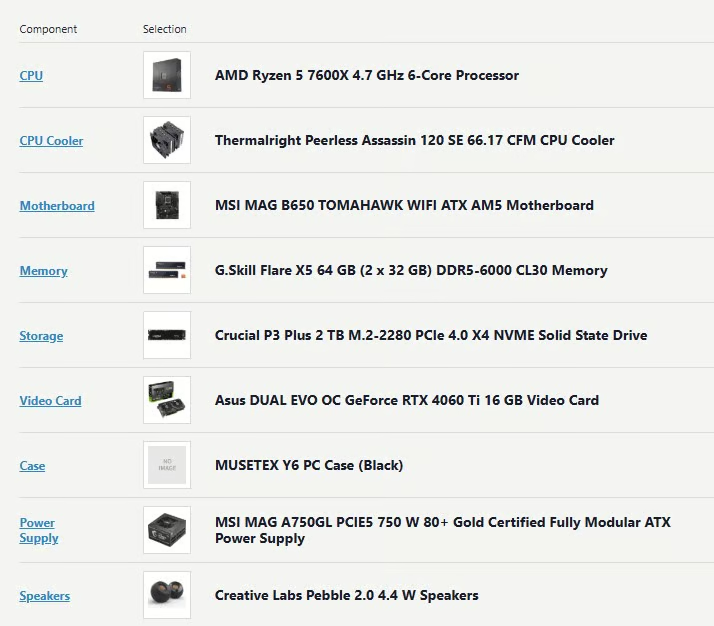
Here’s my parts list that Gemini helped put together on https://pcpartpicker.com/. I had no idea what parts I even needed, so in Chrome, I hit the Ask Gemini button and pulled up the sidebar. I went to PC Part Picker and gave Gemini control of my mouse, and it went through and picked out the parts, resolved conflicts, and even told me that some of the prices listed were way too expensive and not to buy until the price comes down. I just sat there and watched it work.
My goal is a budget pc that will run high-end open-source video models. The price list total came in around $1,200. Yesterday, I spent around $550 at Amazon Deal Days, but I still have the expensive video card, the SSD storage, and the RAM to buy.
An Important Tip From Me
While AI is very helpful, it’s not perfect. I’ve been using it to help build a pc for creating videos. Here’s what I’ve learned:
- Double-check its work; it can make mistakes
- Give it reminders of what you’re doing because it can forget
- Ask AI questions, even stupid ones, because it can lead you astray
All in all, I still give it a 9/10 rating for its help!
~ Connie
First published June 27, 2026
Leave a Reply